A potential client visits your website, submits an enquiry and waits for a response. Your team eventually replies, schedules a consultation, prepares a proposal and follows up manually.
Meanwhile, another prospect may already be speaking with a competitor.
For law firms, accounting practices, consultancies and other professional businesses, the problem is often not a lack of enquiries. It is the time and coordination required to turn those enquiries into signed clients.
Professional services sales pipeline automation connects lead capture, qualification, consultations, proposals, follow-ups and client onboarding into one organized system.
The goal is simple: respond faster, reduce missed opportunities and help highly paid professionals spend more time winning and serving clients.
Why Professional Firms Lose Clients Between Enquiry and Contract
Many professional firms still manage client acquisition through disconnected emails, spreadsheets, calendars and individual employee follow-ups.
An enquiry arrives through the website. Someone forwards it to a manager. A consultation is scheduled manually. Proposal preparation takes several days, and follow-up depends on someone remembering to send another email.
Each disconnected step creates unnecessary friction.
A connected client acquisition automation system helps ensure enquiries move through a defined process, with clear responsibilities and fewer administrative delays.
Step 1: Capture Every Client Enquiry Automatically
Potential clients may contact your firm through website forms, email, WhatsApp, advertising campaigns or referrals.
When enquiries arrive through different channels, maintaining a complete sales pipeline becomes difficult.
A centralized CRM can collect information from supported lead sources and create a structured record for each opportunity.
The system can record the enquiry source, requested service, contact information and assigned team member.
This reduces manual data entry and gives management better visibility into new business opportunities.
Step 2: Qualify Leads Before Senior Professionals Get Involved
Not every enquiry requires immediate attention from a senior consultant, lawyer, accountant or business advisor.
Some prospects need basic service information, while others may not match the firm's service requirements.
An AI-assisted qualification workflow can collect relevant information about the prospect's business, requirements, timeline and service interests.
The CRM can then route enquiries according to predefined business rules.
This helps professionals focus on suitable opportunities rather than spending valuable time gathering basic information.
For regulated professional services, AI qualification should remain administrative and must not replace necessary professional assessments or decisions.
Step 3: Automate Consultation Scheduling
Scheduling a consultation often involves several emails to find a suitable time.
A connected booking system can simplify this process by allowing qualified prospects to request or select available consultation slots.
Once a meeting is confirmed, the system can update the calendar, notify the assigned professional and send appropriate appointment details.
Automated reminders can also reduce unnecessary scheduling communication.
The result is a smoother transition from initial enquiry to meaningful client conversation.
Step 4: Generate Proposals Faster With AI
Proposal preparation can consume significant professional time, especially when firms repeatedly prepare similar documents.
AI-assisted proposal workflows can use approved templates, service descriptions and verified client requirements to prepare initial drafts.
A professional can then review the scope, deliverables, pricing and contractual commitments before sending the final proposal.
This reduces repetitive document preparation without removing human accountability.
The objective is faster proposal turnaround, not automatically generated commitments without professional review.
Step 5: Automate Proposal Follow-Ups
A proposal does not always receive an immediate response.
Prospective clients may need internal approval, additional information or time to evaluate their options.
Without a structured follow-up process, opportunities can remain inactive until an employee remembers to contact the prospect.
CRM automation can create follow-up tasks, send appropriate reminders and notify the responsible team member when action is required.
The system can also record proposal status and relevant communication history.
This makes follow-up more consistent while keeping important commercial conversations under human control.
Step 6: Connect Proposal Acceptance With Digital Agreements
Once a client accepts a proposal, the process should move smoothly toward formal engagement.
A connected workflow can initiate approved agreement preparation, route documents for review and support electronic signatures through suitable platforms.
When the agreement is completed, the CRM can update the opportunity status and trigger the next administrative steps.
Legal and contractual requirements vary by service and jurisdiction, so professional review and appropriate approval controls remain essential.
The business benefit is less manual coordination between proposal acceptance and formal client engagement.
Step 7: Automate New Client Onboarding
Winning a client is only the beginning of the relationship.
Many firms still manage onboarding through separate emails, document requests, spreadsheets and internal checklists.
A connected onboarding workflow can coordinate suitable welcome communications, administrative forms, document requests and internal task assignments.
Where appropriate, clients can use a secure portal to provide required information and track outstanding administrative steps.
Sensitive client information must be handled through systems with suitable confidentiality, access and security controls.
Automation helps create a more organized onboarding experience while reducing repetitive work for employees.
Step 8: Connect Sales With Service Delivery
One of the most common operational gaps occurs when a client moves from the sales team to the professionals responsible for delivering the service.
Important information may remain inside emails, proposals or individual CRM notes.
A connected handoff workflow can transfer approved client information, agreed deliverables, deadlines and relevant responsibilities into the firm's project management system.
This reduces repeated information requests and helps delivery teams understand what has been agreed.
The result is better continuity between winning a client and starting the actual work.
Step 9: Track Your Entire Client Acquisition Pipeline
Professional firms should understand more than the number of enquiries received.
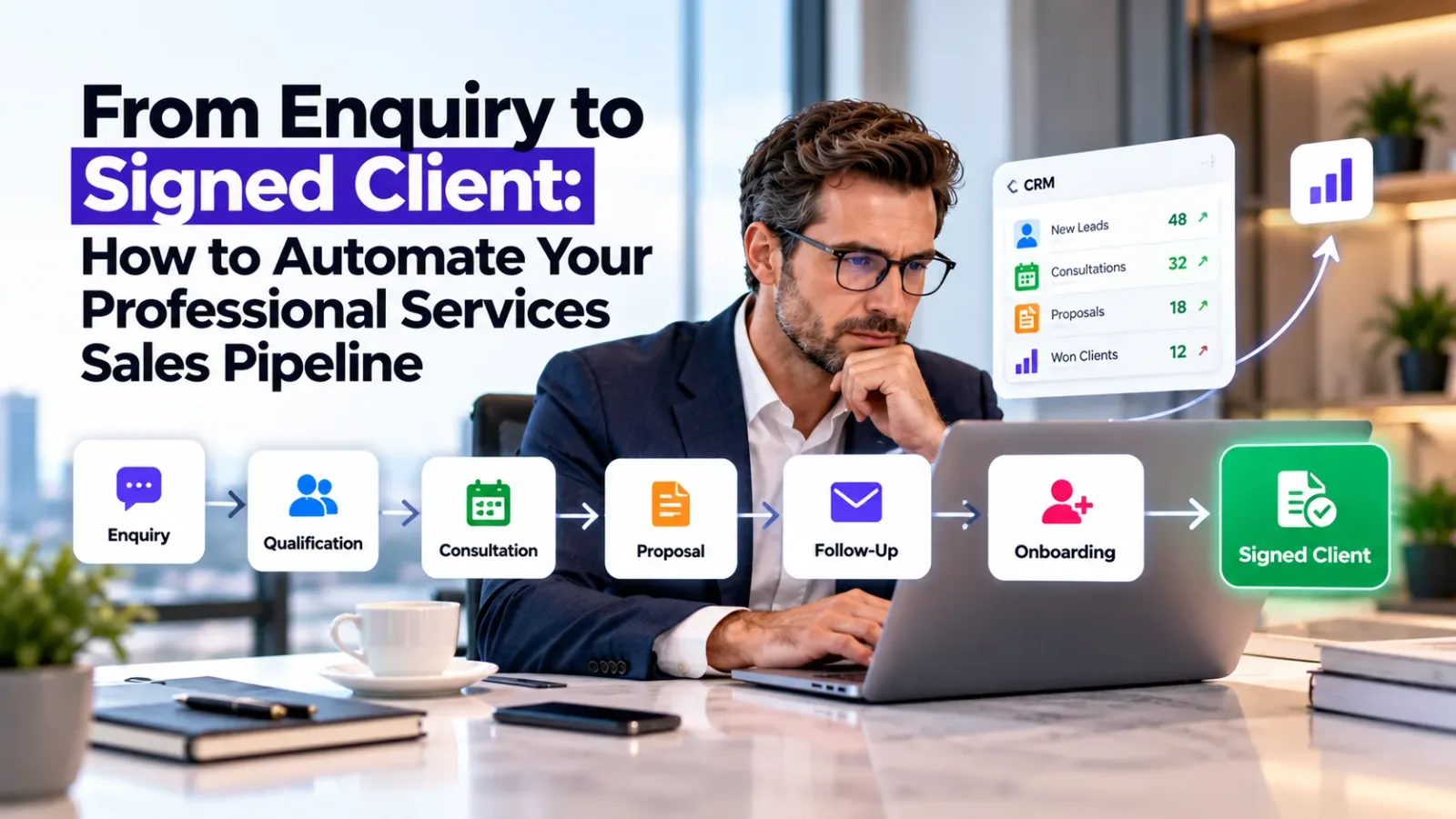
A connected CRM dashboard can reveal how enquiries progress through qualification, consultation, proposal, agreement and onboarding.
Useful measurements include enquiry response time, consultation booking rate, proposal acceptance rate, sales cycle duration and client acquisition cost.
These indicators help management identify where qualified opportunities are slowing down.
For example, if consultations are being completed but proposals take too long to prepare, improving proposal workflows may create more value than increasing advertising expenditure.
Better pipeline visibility helps firms improve conversion efficiency before spending more money generating leads.
What Does an Automated Professional Services Sales Pipeline Look Like?
Consider a consulting firm receiving enquiries through its website and marketing campaigns.
Instead of managing each step manually, the firm connects its CRM, calendar, proposal software and onboarding tools.
The workflow becomes:
New Enquiry → CRM Capture → AI-Assisted Qualification → Consultation Booking → Proposal Draft → Follow-Up → Signed Agreement → Client Onboarding → Project Handoff
Each stage can trigger the next appropriate administrative action while retaining human review where needed.
This is an illustrative workflow, not a guaranteed conversion outcome.
The firm gains a more consistent process, clearer accountability and less dependence on disconnected manual tasks.
Do You Need a New CRM to Automate Your Sales Pipeline?
Not necessarily.
Many professional firms already use CRM platforms, accounting systems, scheduling software and document management tools.
The first step should be evaluating whether these systems can be connected through existing features, supported APIs or custom integrations.
When standard tools cannot support specialized requirements, custom software or AI workflows may provide additional flexibility.
At Oxmite, we help businesses connect existing systems and build AI-powered sales automation, custom CRM solutions and internal workflow tools.
The objective is to solve operational problems without introducing unnecessary technology.
How to Start Automating Your Client Acquisition Process
Begin by mapping how a new enquiry currently becomes a signed client.
Identify where employees repeatedly enter information, manually schedule meetings, prepare similar documents or chase outstanding responses.
Then prioritize the activities that consume the most time or create the greatest risk of missed opportunities.
A practical implementation usually begins with centralized lead capture and CRM tracking before introducing qualification, proposal and onboarding automation.
Once the workflow is reliable, AI-assisted capabilities can be introduced where they provide measurable value.
This phased approach makes automation easier to manage and evaluate.
Build a Professional Services Sales Pipeline That Converts More Efficiently
Your professionals should spend their time understanding client problems, delivering expertise and building valuable relationships.
They should not spend unnecessary hours copying lead information, coordinating routine meetings or manually tracking every proposal.
Professional services sales pipeline automation helps firms connect their business development activities into one structured system.
At Oxmite, we develop AI sales automation, CRM integrations, proposal workflows and client onboarding solutions designed around real business processes.
Our approach focuses on reducing repetitive work, improving pipeline visibility and helping teams manage qualified opportunities more effectively.
Final Takeaway
A professional services firm does not always need more leads to improve client acquisition.
Sometimes it needs a better system for managing the opportunities it already receives.
By connecting enquiries, qualification, consultations, proposals, follow-ups and onboarding, firms can reduce administrative friction and create a more consistent path from prospect to signed client.
The strongest automation strategy combines technology with professional judgment, clear responsibilities and measurable business outcomes.
Are valuable client enquiries getting delayed or lost between your website, inbox, CRM and proposal process?
Audit Your Client Acquisition Pipeline with Oxmite and identify opportunities to automate lead management, consultations, proposals, follow-ups and onboarding.