Missed appointments and last-minute cancellations can quietly reduce a clinic's revenue. The appointment slot was reserved, staff time was allocated, and another patient may have been waiting for availability.
The problem is not always a lack of patients. Often, it is the absence of a connected system for reminders, confirmations, cancellations and rebooking.
With clinic appointment automation, healthcare businesses can reduce avoidable no-shows, identify cancelled slots sooner and offer available appointments to waiting patients without relying entirely on manual reception work.
Why Missed Appointments Cost Clinics More Than Revenue
Every unused appointment slot represents capacity that cannot always be recovered.
When patients forget appointments or cancel too late, clinics may lose the opportunity to accommodate another patient. Reception teams also spend time making reminder calls, updating schedules and contacting patients individually.
For a busy clinic, these small inefficiencies can accumulate.
The solution is not simply sending more reminders. It is connecting the entire appointment journey so patients can confirm, cancel or reschedule easily, while the clinic can respond quickly when availability changes.
1. Automate Appointment Reminders
Patients may miss appointments because they forget the date, misunderstand the time or overlook earlier booking information.
Automated reminders can help patients prepare for their scheduled visits.
A clinic can configure SMS, WhatsApp or email reminders based on its appointment policies, communication preferences and applicable consent requirements.
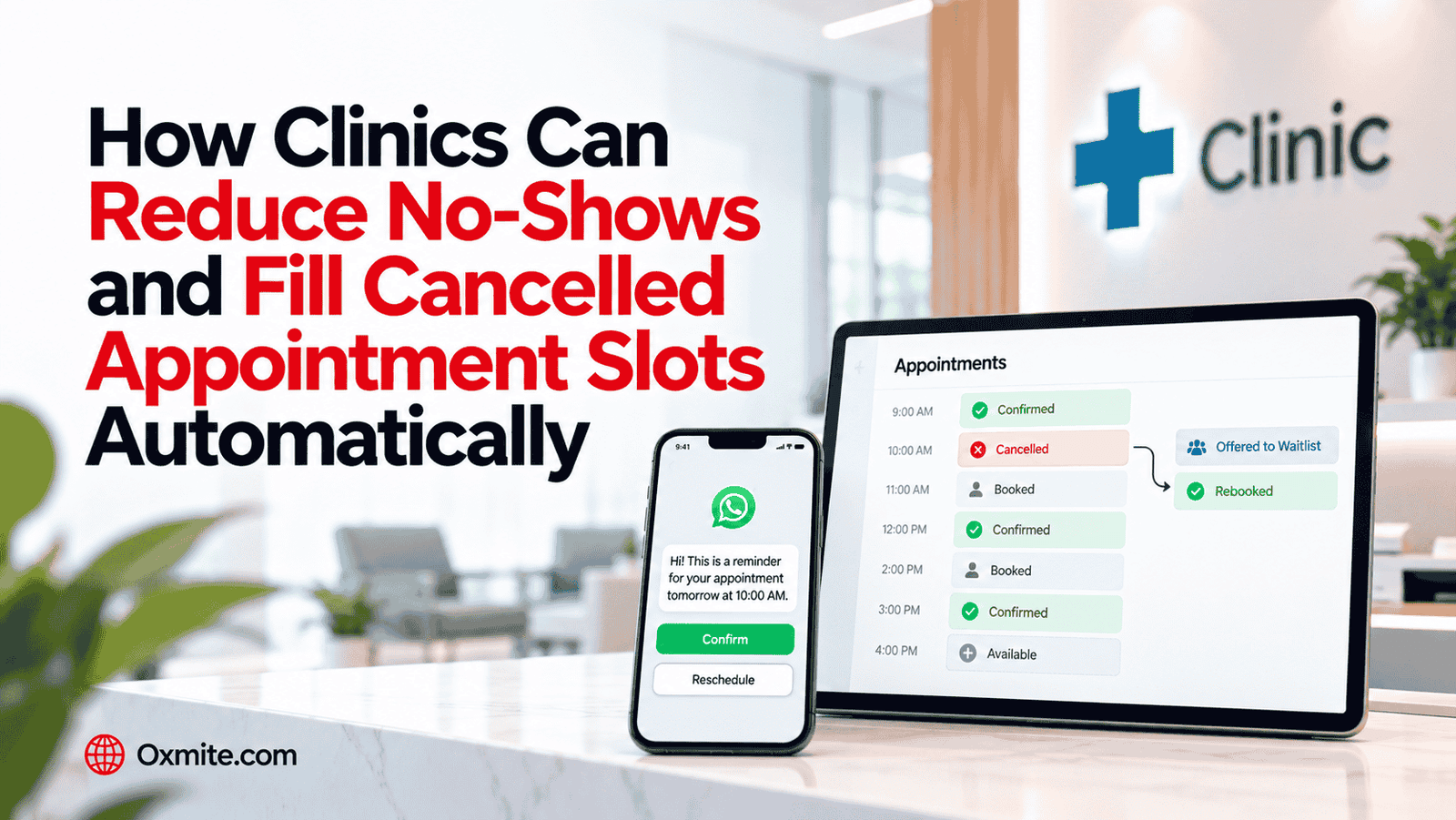
For example, a workflow might send a reminder before the appointment and allow the patient to confirm or request a change.
The business objective is to reduce preventable no-shows without increasing reception workload.
2. Let Patients Confirm Appointments Automatically
A reminder becomes more useful when the patient can respond.
Instead of requiring reception staff to telephone every patient, an automated confirmation system can record whether the patient intends to attend.
Confirmed appointments remain scheduled, while requests to cancel or reschedule can be directed into the appropriate workflow.
Unanswered confirmations can be flagged for follow-up according to clinic policy. They should not automatically be treated as cancellations.
This gives reception teams better visibility into appointment status without requiring constant manual checking.
3. Make Cancellation and Rescheduling Easier
Patients sometimes miss appointments because changing the booking feels inconvenient.
If cancelling requires calling during office hours or waiting for reception, patients may delay informing the clinic.
A well-designed appointment system can provide a straightforward way to request cancellation or rescheduling.
When a cancellation is approved and recorded, the scheduling system can make that appointment slot available again.
The earlier a clinic knows about a cancellation, the more opportunity it has to offer the slot to another patient.
4. Automatically Fill Cancelled Appointment Slots
A cancelled appointment does not always need to become unused capacity.
With suitable booking software and workflow automation, the clinic can identify newly available appointment slots and notify eligible patients who are waiting.
For example, when a patient cancels an afternoon appointment, the system could offer that time to another patient who has requested an earlier visit.
The booking must still respect practitioner availability, appointment type, required duration and other scheduling rules.
Once the appointment is accepted and confirmed, the system should update availability immediately to prevent duplicate bookings.
This creates a more efficient way to recover appointment capacity.
5. Build an Automated Patient Waitlist
Many clinics maintain waiting lists through spreadsheets, telephone notes or separate messaging conversations.
This makes it difficult to match newly available appointments with patients who can actually attend.
An automated waitlist can record suitable appointment preferences, available times and other relevant scheduling information.
When an appropriate slot becomes available, the system can contact eligible patients through their permitted communication channels.
A controlled booking process can then assign the appointment according to the clinic's waitlist rules.
The result is less manual coordination and a better opportunity to use available appointment capacity.
6. Connect SMS and WhatsApp With Your Booking System
Messaging is most effective when it connects directly with appointment data.
A reminder sent through WhatsApp or SMS should not operate separately from the clinic's calendar.
When patients confirm, cancel or request a new appointment, the relevant information should move into the scheduling workflow.
This helps prevent situations where reception staff receive a cancellation message but the original appointment remains blocked in the calendar.
Appropriate consent, privacy safeguards and messaging-platform requirements must be built into the process. Sensitive medical details should not be included unnecessarily in automated messages.
At Oxmite, we help businesses connect communication tools, booking systems and workflow automation around practical operational requirements.
7. Use CRM Automation for Appointment Follow-Up
Not every patient who cancels is ready to select another appointment immediately.
A suitable CRM or appointment-management workflow can help organize permitted administrative follow-up so these requests do not disappear.
For example, a patient who asks to reschedule can enter a follow-up process that reminds the appropriate team to arrange a new time.
The system can also identify unresolved appointment requests that require staff attention.
For healthcare businesses, these workflows must use appropriate data protection, access controls and human oversight.
The objective is to make follow-up more reliable, not to automate sensitive clinical decisions.
8. Track No-Shows, Cancellations and Recovered Appointments
A clinic cannot properly evaluate appointment automation without measuring what happens to its schedule.
Useful performance indicators include the appointment no-show rate, cancellation rate, cancellation notice time, reminder confirmation rate and the number of cancelled slots successfully rebooked.
Clinics can also track how much reception time is spent managing appointments before and after automation.
These measurements help distinguish between simply sending messages and actually improving scheduling efficiency.
How Much Revenue Could Your Clinic Recover?
Consider a clinic that regularly experiences missed appointments and last-minute cancellations.
If an automated workflow helps patients cancel earlier, reminds others to attend and successfully fills some released slots, the clinic may generate additional completed appointments without increasing its physical capacity.
A practical estimate is:
Additional completed appointments × Average realized revenue per appointment = Potential additional appointment revenue
This is an illustrative calculation, not a guaranteed result.
The actual financial benefit depends on patient demand, appointment availability, operating costs, booking rules and the number of previously unused slots that can genuinely be recovered.
The important opportunity is improving the use of capacity the clinic already has.
Build a Connected Clinic Appointment Workflow
Appointment reminders alone are useful, but they become more valuable when connected with confirmations, cancellations, waitlists and scheduling.
A modern workflow can connect the entire process:
Appointment Booked → Reminder Sent → Patient Confirms or Requests Change → Calendar Updated → Cancelled Slot Offered to Waitlist → New Appointment Confirmed
This reduces disconnected administrative steps and helps reception teams focus on patients who require personal assistance.
At Oxmite, we develop workflow automation, CRM integrations and SMS/WhatsApp communication solutions designed around existing business systems.
For clinics, the objective is to create a more reliable appointment process that supports patients, improves administrative efficiency and reduces avoidable scheduling gaps.
Final Takeaway
Clinics do not always need more appointment enquiries to improve revenue. Sometimes they need a better way to manage the appointments they already receive.
Clinic appointment automation can help reduce preventable no-shows, capture cancellations earlier, coordinate waitlists and improve rebooking.
The strongest results come from connecting reminders, patient responses, booking software and follow-up workflows into one coordinated system.
Are missed appointments and cancellations creating unnecessary gaps in your clinic's schedule?
Audit Your Appointment Workflow with Oxmite to identify opportunities for automated reminders, confirmations, cancellation handling, waitlists and appointment rebooking.